Sometimes you can’t trust every link on your Twitter timeline. Yesterday, security researcher Stefan Esser tweeted the following:
Esser is the researcher who developed the Antid0te ASLR utility for jailbroken iPhones. If he helps to protect jailbroken iPhones, why would he want to infect me?
Google just announced its new near field communication payment service, Google Wallet. We’ve looked at Google’s NFC service and security before, but at that time the details were still scarce. Now we’ve gotten a better look at what lies within Google Wallet. It’s part service, part hardware, and part app.
[...]
The App
The Google Wallet app plays a role in storing and accessing your credit card information from the “secure element”. Unlike with your credit cards, you need to enter a PIN to initiate a tap-and-pay transaction. This step prevents the bad guys from brushing by you in a crowd to grab your info via NFC.
Android apps are relatively easy to reverse-engineer, so that would probably be the first step an attacker would take. Google says that only authorized apps will have access to the “secure element” chip, and the chip uses asymmetric encryption to authenticate access to stored secrets (credit card credentials). This implies that an attacker has a good chance of extracting the authentication key from the Google Wallet app. The next step would be to create a malicious application that emulates the official Wallet app to fool the “secure element” chip into giving up your credentials. From here, the attacker can collect account information for sale or for attempts at cloning the data to new NFC cards.
The Google Wallet app has not yet been widely released, so it’s difficult to properly identify possible weaknesses. Once it’s available on more phones, we’re bound to see more research from both the criminal element and legitimate security researchers.
Over the weekend Google released the Android Market Security Tool to help clean up devices infected with the DroidDream malware. The Android/DrdDream family of malware used a pair of exploits (Expoit/LVedu and Exploit/DiutesEx) to gain root access on vulnerable Android devices. More than 50 Android applications were reported to be infected; all were pulled from the Android Market. The applications were all versions of legitimate programs that were repackaged by the malware authors with malicious code.
Android/DrdDream sends a collection of information (IMEI, IMSI, OS version, etc.) to the attacker and also attempts to download additional payloads. Although the malware uses the pair of root exploits, it doesn’t actually need root access to send the data to the attacker.
Inside the Android Market Security Tool
Google has its official statement on the the tool on the Android Market help site. They list a number of steps they’ve taken to remedy Android/DrdDream (“March 2011 Security Issue”):
Suspending the developer accounts (three users) and removing the malicious applications from Android Market
Remotely uninstalling the malicious apps from infected devices
Pushing out the Android Market Security Tool to infected devices
Disabling accounts, taking apps out of the store, and hitting the remote-app kill switch were already well known ways for handling bad Android apps. Sending a security application to a phone is a whole new addition to the toolbox.
As a security researcher I find it interesting to see how new security tools are put together, more so when they come from an operating system developer. Normally I dig into the internals of malware; this time I got to see inside a mobile malware removal tool. Google’s security tool is available on the Android Market, so I was able to grab a copy for analysis.
The Android Market Security Tool is an Android app that also has a non-Dalvik native application component called droidreamclean. Android/DrdDream drops a few additional files (native binaries, an additional APK, etc.) on an infected phone. Because the files are located outside of the app directory, simply uninstalling the app won’t remove them from the phone. Really cleaning the phone requires access to the file system at a level that standard Android applications can’t reach. The security app launches droiddreamclean to delete the additional files and restore some security settings.
The droiddeamclean binary deletes the second payload, DownloadProvidersManager.apk, downloaded by the Android/DrdDream malware. This prevents the malware from downloading additional malware or updates to the device.
After it gains root access, Android/DrdDream attempts to copy a second payload from its assets directory to the application directory (/system/apps/DownloadProviderManager.apk). This is a manual installation that completely bypasses the Android Market and because the Market doesn’t record the installation, it can’t be remotely killed. droiddreamclean doesn’t have this problem and instead tries a couple of uninstallation methods: using the “pm” package manager or manually deleting the APK.
The malware copies a renamed “su” executable (/system/bin/profile) to a directory of other system commands. This allows the attacker or updated malware to gain root access in the future. The Security Tool gives that executable the same treatment as the downloader component of Android/DrdDream.
In case the remote kill does not work, the security tool includes a list of apps that are removed using the command-line package manager. The Android/DrdDream authors definitely are not going to be able to slip one through.
A selection of the 58 packages removed by the Android Market Security Tool.
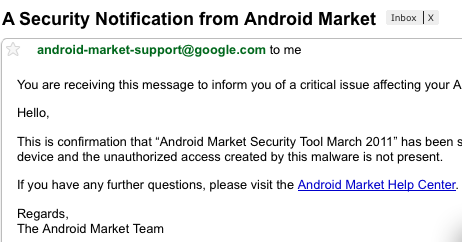
After droiddreamclean finishes, the Android Market Security Tool informs Google that your phone is now clean. It then uninstalls itself. At the end of all this, you get an email from Google telling you that it has removed the malware and that no issues remain.
Google informs you after the Android Market Security Tool finishes cleaning your phone.
Is the Android Market Security Tool enough?
The Android Market Security Tool is a pretty comprehensive tool, but it’s really designed only to clean up Android/DrdDream and its side effects. The tool itself doesn’t patch or reflash the operating system, so the vulnerabilities exploited by Android/DrdDream will remain. Updating the operating system will require help from the manufacturers of the various affected Android devices.
For similar infections, Google might have to follow the route that other security software takes and provide regular updates. The creation of the security tool and the work put into handling the Android/DrdDream issue shows that Google understands the need for mobile security software.
"The Zeus (Zbot) crimeware is sold to criminals as a complete toolkit for building custom Trojans, usually to steal banking logins. The Trojans are generally quite complex; injecting HTML into banking websites on the Internet Explorer and Firefox web browsers, intercepting keystrokes, and grabbing screenshots. Until a few months ago the Zeus infrastructure targeted only Windows PCs, but the adoption of certain security measures (mTANs sent via SMS) used by some banks caused the criminals to change their tactics.
SymbOS/Zitmo.A was a mobile spyware application used to intercept and forward the mTAN SMS messages sent from an infected user’s bank to an attacker. This was implemented by the Zeus Trojan for gathering information from victims about their mobile phones so that it could send a targeted download link to them. The attacker could then change what numbers were monitored by the spyware to go after specific banks. This particular group of crooks was using SymbOS/Zitmo.A in a targeted attack against Spanish banks. It was suspected that a Blackberry version of the spyware was also being distributed, but no samples have yet been found."
[...]
Mobile Malware Benefiting From Virtual Machines?
The people behind Zeus are now targeting at least two, if not three, of the major smartphone platforms. Writing for one smartphone platform can be challenging, writing for multiple devices can be a bigger headache. By writing a malicious app for the .Net Common Language Runtime(CLR) and Compact Framework, the Zeus authors might be trying to take advantage of coding for virtual machines (VMs).
There are a number of benefits of using VMs for the malware author:
maintaining compatibility
APIs on the VM will remain the same
code reuse
working parts of the malware (SMS sending, Bluetooth transfers, etc.) don’t need to be rewritten
affecting more devices/OS
malware can run on vastly different phones or devices
[...]
Alien Dalvik currently runs on a Nokia N900. Apps run at the same speed as on an Android phone with nearly identical specs. Credit: PRNewsFoto/Myriad Group AG
Given the availability of a common smartphone-based virtual machine (Dalvik on Android/Alien Dalvik on other OS) it would not surprise us if the Zeus authors eventually consolidated their mobile malware onto that single platform. Instead of just “Angry Birds” one could also get the latest spyware or SMS Trojan.
It’s always tough to get a ticket for Washington D.C.’s ShmooCon hacker conference. Just over 1,200 tickets were available in three rounds of ticket sales for the January 28-30 event. It’s a sign of the conference’s popularity that each round sold out in under 10 seconds. At about a third of the size of a larger conference like Black Hat, it’s much easier to talk to the speakers without fighting with a crowd. Past years have had good presentations on mobile phone security and this year is no exception.
[...]
This year there are nearly twice as many smartphone-related talks as at last year’s Shmoocon. It looks like the start of an interesting year in smartphone and mobile threat research.
The 27th Chaos Communications Congress (27C3), a computer security conference held in Berlin, has offered several good mobile and embedded security talks in the past few days. SMS-based vulnerabilities, vulnerabilities in mobile phone radios, and laptop rootkits that infect peripheral chips instead of the main CPU were among some of the new research presented.
[...]
Collin Mulliner and Nico Golde demonstrate maliciously crafted SMS message attacks against a collection of feature phones.
[...]
Ilja van Sprundel describes how to reliably identify mobile phone OS versions using a maliciously crafted MMS message and a web server.
[...]
Ralf-Philipp Weinmann explains the process he used to discover vulnerabilities in the code running on Baseband processors.
[...]
The conference continues
The Chaos Communications Congress is an annual event that ends the year with a lot of good research and food for thought. 27C3 ends this Thursday, but the talks I’ve cited, or any others you might be interested in, will be available online soon.
"Jailbreaking your iOS device used to simply be about gaining some freedom–getting root access, installing native apps, and adding or modifying themes. The worst that could happen would be running into a slightly malicious installation package. Then we met the OSX/RRoll family of worms that activelywent after jailbroken devices. Part of the risk came from insecure defaults and reduced security caused by the jailbreaking process.
"The initial release of Antidote is scheduled for December 24, but Esser is not stopping with adding ASLR to jailbroken iOS devices. In upcoming releases, Antid0te will also re-enable code signing and other protections. With these changes we will eventually see an overall increase in the security of jailbroken iOS devices–resulting in their becoming as secure as, if not more so than, stock iOS devices."
In the last week there have been a few vulnerability disclosures for mobile web browsers. These threats affect a number of smart-phone platforms: Android (Google), WebOS (Palm), and iOS (Apple). Although all three platforms have their own apps and environments, it’s interesting that they’re all vulnerable through the same entry point of the mobile browser.
[...]
Patches: a compete solution?
A number of these vulnerabilities have been patched, but this does not secure all of the affected devices. Embedded systems and mobile phones in particular can’t be patched as easily as your desktop computer. For over-the-air patches there are costs involved in bandwidth, transmission time, and device downtime that argue against frequent updates. These updates also do not include testing and QA on every affected device. The additional work can result in the “fixed it in CVS/SVN/etc.” situation–in which developers have fixed a bug in the project’s source code but the fix hasn’t yet reached current compiled programs.
The outlook with smart phones isn’t quite as stark as with phones with fewer features. Whereas simple phones have almost all their system software and applications in the firmware, smart phones tend to have theirs on easily writable storage. A buggy browser can be fixed with a small signed update, rather than requiring the phone firmware to be reflashed. Or we may see a move toward placing thin firewalls/IDS layers between applications and potential attack vectors. As more vulnerabilities are discovered in mobile applications, these small targeted patches may become the norm.
The more your mobile phone is used for payments (as a “wallet in your phone”) the more it becomes a target for attackers. Last week we discussed attacks that target NFC-enabled phones.
If you are like me, there are times when you will misplace your hotel key. Times when you’re switching a bucket of ice between hands while searching your pockets or bag. Wondering if you’ve left the key in your room or possibly the lobby. Thinking “I’ve always got my phone on me, wouldn’t it be so much easier if I could use it to open the door.” OK, maybe I’ve never thought that last bit, but the folks at high-security lock makers Assa Abloy apparently have. They’re running a four-month trial of their Mobile Key technology at the Clarion Hotel in Stockholm. Essentially a guest checks in with a phone and the room key is sent directly to the device. No more misplaced keys.
The hotel trial is a joint effort among Choice Hotels Scandinavia, mobile carrier TeliaSonera, and near field communications (NFC) vendor Venyon. NFC is an extension of the same technology used in “tap and pay” credit cards. NFC turns your phone into a mobile wallet. In this case, just tap your NFC-enabled phone next to the hotel door knob and it unlocks.
Just hold your mobile phone near the door and it unlocks. What could possibly go wrong?
Assa Abloy has an interesting video showing off the many uses of their Mobile Keys (house key, office key, temporary key for contractors, hotel keys, etc.). You can issue temporary keys to contractors or cleaners, and you receive a notification whenever one of the temporary keys is used. In the same way, when you check in to a hotel using your phone, they can send your hotel key directly to your phone.
Because most people don’t have NFC-enabled phones, the Clarion’s guests are given new versions of a Samsung phone. The Samsung S5230 was a popular touch-screen phone released last year, and this year it’s been updated for NFC. So for the moment guests will still carry multiple devices–two phones–but eventually we expect to use one smartphone for nearly everything.
The Java Mobile Keys application provides relevant information on the hotel key, and a handy reminder of the room number.
NFC security NFC phones sound like a great improvement over hotel keys and keycards. If you’re like me, however, you’re probably wondering how it could all go horribly wrong–especially if you’re familiar with Collin Mulliner’s security research on NFC-enabled phones.
Mulliner took a look at a number of Nokia NFC phones. He tried a number of attacks against the devices: phishing, fuzzing, spoofing. He also developed a python library and tools to read and create NFC tags. This library generated a number of specially crafted tags to fuzz the NFC reader on the Nokia 6131. This research isn’t current for the latest NFC phones, but it serves as a basis for expanding to new devices.
A Nokia 6131 NFC-enabled phone loading a URL from a Smart Poster. This phone was investigated by security researcher Collin Mulliner. (Credit: Timo Arnall at the English Wikipedia project)
Unlike the Nokia 6131, the Samsung S5230 supports the Security and Trust Services API for the J2ME (JSR-177) standard for secure distribution of Mobile Keys. This is basically using public key encryption to ensure that the key your phone receives came from the hotel (no spoofing attacks) and that it hasn’t been tampered with on the way (no man in the middle attacks).
Your phone’s accepting a fake key isn’t the most likely attack. An attacker or thief would rather get the actual key or, in this case, an electronic copy of your key. With NFC and other RFID systems, there’s an attack called ghost and leech, or simply a relay attack. Here’s a quote from the first paper to mention the attack: “The ghost is a device which fakes a card to the reader, and the leech is a device which fakes a reader to the card.” An attacker would either need to steal an actual reader (from a hotel door) or manufacture a compatible reader to function as the leech, and similarly clone the hardware used in your phone to play back the Mobile Key to your hotel room’s door as the ghost. It’s difficult for attackers to get access to the hardware during a trial, but once the hardware is widely in use there will be opportunities to acquire it. We’ve already seen as much with RFID credit card readers sold on eBay.
These are attacks that attempt to intercept the key during transit or block it from arriving on your phone. There is still the possibility that an attacker will go after the device that holds the key or the mobile app that interfaces with the NFC hardware. The Samsung S5230 is a J2ME device and the Mobile Keys app is very likely a Java program. Generally the threats we’ve seen on J2ME phones have been Trojan horse programs, designed to trick users into harming themselves or costing them money. It’s unlikely that a Trojan could properly convince a user to install it in place of the legitimate Mobile Keys app. It would make more sense, as on platforms such as Android, to go after the underlying operating system or Java Virtual Machine (JVM). Two years ago security researcher Adam Gowdiak exposed vulnerabilities in the JVM used by a number of well-known mobile phones. He developed a number of proof-of-concept exploits and malware targeting the JVM. Given that the flaws were in the JVM and not in the applications, the fixes would require a firmware update on affected phones. Although these threats are more difficult to defend against, they also require a much higher skill level and a greater amount of work from an attacker.For the moment these are either old or theoretical attacks. We still have some time before attackers and thieves catch up to the new technology.I hope the trials will go well and in the near future I won’t need to shuffle things around in my arms to hunt down that elusive hotel key. But finding my misplaced mobile phone is another story.
Some of the most interesting research on mobile botnets is being done in the lab. Security researchers Collin Mulliner and Jean Pierre Seifert have put together a robust Proof-of-Concept (PoC) iPhone botnet.
Their research was presented at the 5th International Conference on Malicious and Unwanted Software (MALWARE 2010) last week. In a presentation titled “Rise of the iBots: 0wning a telco network”, Mulliner/Seifert look into various methods of establishing command and control (C&C) of a botnet over a mobile telephone company’s network. Very timely, I added an overview of the research to my talk on Saturday at Toorcon.
The researchers didn’t implement any spreading functionality so that there was no risk of the botnet escaping the lab. They instead concentrated on seeing which communication methods were best for maintaining a distributed computing network (like a botnet); SMS, http, or P2P. Unlike general PC security researchers, these two have experience in the challenges and issues involved in developing for low powered, limited CPU/RAM devices with inconsistent network connectivity(EDGE, 3G, WiFi, etc.).
The SMS method, using text messages to send commands to the bots, is commonly used by other mobile spyware and botnets. The more advanced malware will also intercept and delete any command SMS messages, so that the user never suspects that they’re infected. Mulliner has previous experience with SMS interception, having presented his research on the topic at the Black Hat USA security conference in 2009.
Instead of using straightforward text-based SMS messages like with other mobile malware, they use binary mode SMS. These are not system SMS messages or “flash” SMS messages that don’t leave a trail in the inbox. They’re just SMS messages with about 140 bytes. Sending in binary lets them encode commands in less space and also helps to make the C&C messages harder to detect. They also determined that in addition to SMS, using a combination of P2P and http protocols could increase the robustness of the botnet.
There’s a joke amongst malware researchers that sometimes it feels like we’re doing QA for the malware authors; calling them out on their bad code. Malware authors aren’t generally known for following secure development or software testing processes. Occasionally it takes a professional developer/researcher to do it right. Mulliner’s research from Black Hat involved fuzzing SMS handlers, so it was amusing to see that they actually fuzzed their botnet’s SMS command handling code. I guess when you’re getting ready to take over your telephone company’s network, you can’t have your botnet fail just because it gets a malformed command SMS.
Since they used binary SMS messages, the botnet commands aren’t as easy to decode as a plain text protocol. The table below shows the breakdown of a command SMS. Mulliner/Seifert were careful in designing their communication protocol to insure that it was safe from replay attacks(responding only to packets with sequence numbers greater than the last command) or hijacking through command emulation(encrypting and digitally signing command messages).
Fig 1 - Binary command SMS messages are broken down into a few parts. Each command SMS is digitally signed to prevent hijacking of the botnet. The sequence number helps to prevent a replay attack. All packets can also be optionally encrypted to further evade detection.
Below is a breakdown of the commands they implemented:
Fig 2 - A human-readable list of the binary commands used in the botnet. Running a command can be used to DDOS a website
After seeing an attempt at a stable, fault resistant, mobile botnet, one might wonder how to protect against such a threat. On that note, we may actually be better off taking a page from Mulliner and Seifert’s presentation:
“Mobile telcos need to think about monitoring and fighting SMS-based botnets”.
This works for threats on the network. On the individual level there are still a few ways to shut the door on attackers:
Install the latest official OS/firmware patches for your smartphone
Avoid pirated software or software from untrusted sources




 Dick Tracy, the great comic strip detective , is known for having great gadgets like his 2-way radio/computer wristwatch. Though a wrist mo...
 When you travel by air a lot you tend to get efficient about packing your bags(like George Clooney in 'Up in the Air' ). Due to effi...